Absences and disruptions
Sick days, delays and closures at your business, without losing appointments
When someone falls ill or something breaks, DameHora shows you which appointments are affected and suggests who can take them or when to move them. Nothing moves on its own. You decide with each customer.
Try it free for 14 daysSee prices
No card · No commitment
Welcome offer: 9,95 € a month for your first 2 months if you subscribe during the trial. Until November 15.
How it works
-
Record the absence
A sick day, a delay or a location closure, in two taps.
-
See what is affected
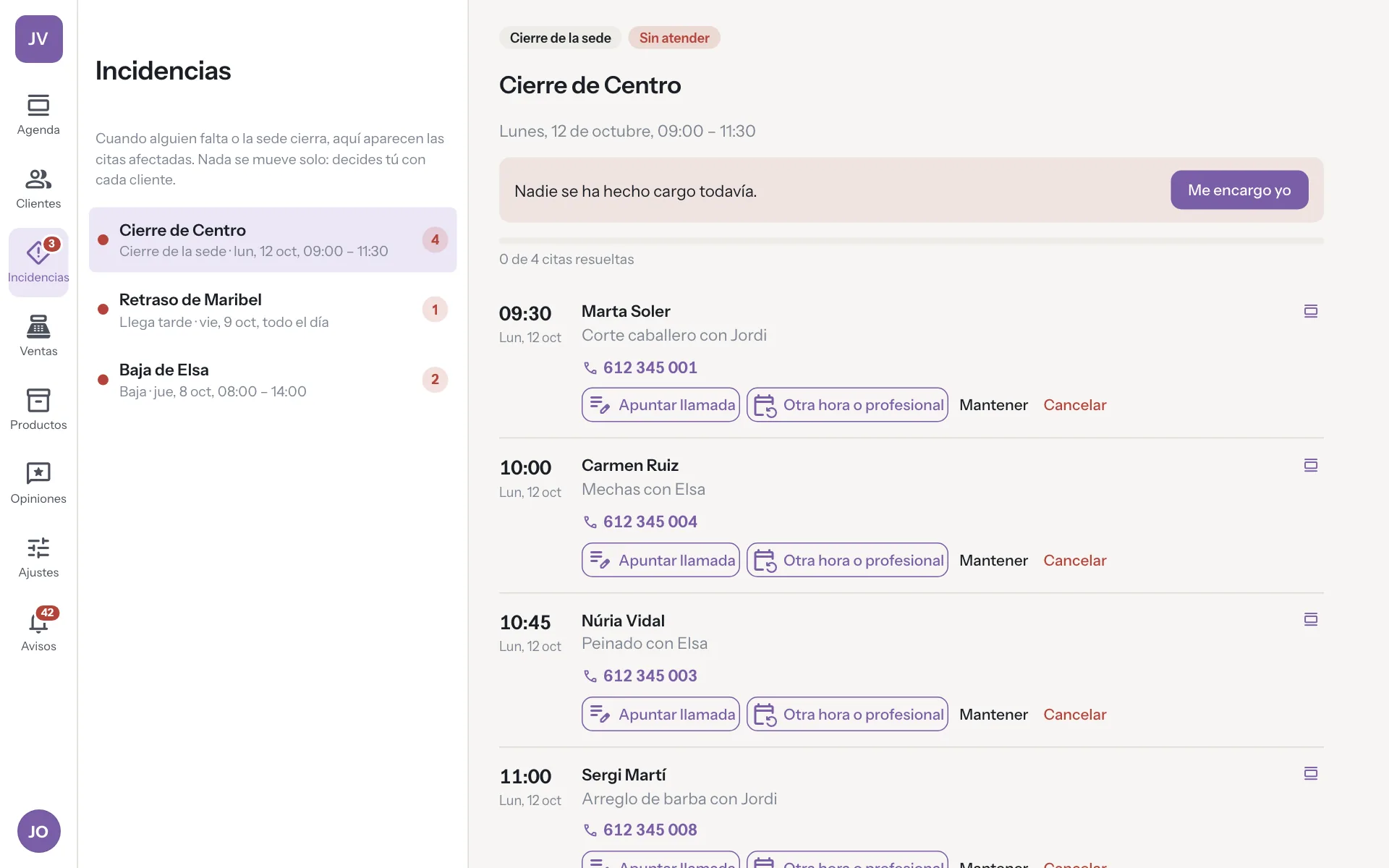
An incident opens with every affected appointment and each customer's contact.
-
Rebook with suggestions
It suggests free professionals and possible times. You confirm and the customer is told.
A real case
Laura calls in sick at 8:00
She has nine appointments today. You mark her absence and an incident opens with all nine, each client's phone number and proposals. Aina is free at the same time for four of them, and the other five can be moved to another day. You call, confirm each change and it is noted who you have told. Before opening, the day is rearranged.
Nobody turns up to find no one to see them.
Sick leave with a notebook versus sick leave with DameHora
-
Which appointments fall through
Without DameHoraYou go page by page through that person's appointments for today and tomorrow.
With DameHoraWhen you mark the absence, the incident gathers them all with each customer's phone number.
-
Who takes them
Without DameHoraYou eyeball each colleague's free slots, one appointment at a time.
With DameHoraIt suggests who is free at the same time and which other times fit.
-
Who you have told
Without DameHoraYou phone and jot down on paper who you have told and who you have not.
With DameHoraEach appointment shows whether you have contacted the customer, and the whole team sees it.
-
An afternoon breakdown
Without DameHoraYou cancel the whole day just in case, or an appointment slips through.
With DameHoraA closure by the hour marks only the appointments in those hours.
-
Online booking that day
Without DameHoraIt keeps offering slots for someone who is not in, and somebody books them.
With DameHoraIt stops offering their slots as soon as you mark the absence.
What you gain
Nothing moves on its own
The system detects, sorts and proposes. A person decides each appointment.
Closures by the hour
A breakdown in the afternoon only flags the afternoon's appointments.
Several appointments at once
Move several appointments at once. Either they all move or none does.
Seen by whoever decides
The alert reaches the people at that location who can sort it out.
For your sector
- Software for hair salons
- Software for barbershops
- Software for nail salons
- Software for beauty salons
- Software for hair removal centres
- Software for brow and lash studios
- Software for make-up studios
- Software for micropigmentation centres
- Software for dog grooming salons
- Software for massage centres
- Software for tattoo studios
- Software for piercing studios
- Software for photography studios
- Software for tailors
- Software for bridal shops
- Software for image consultancies
- Software for accountancy firms
- Software for law firms
- Software for phone repair shops
Frequently asked questions
Are appointments cancelled automatically?
No. A person decides each appointment. The system only detects, sorts and suggests.
What if the closure is only in the afternoon?
Only the appointments in that window are flagged. The rest of the day stays as it is.
What happens to online booking that day?
It stops offering the absent person's slots, so nobody books an appointment that can't be served.
Is there a record of what was done?
Yes. Each incident keeps which appointments were moved, who was told and who did it.
What if the absence lasts several days?
The incident gathers the appointments for all those days. You deal with them in batches and it stays open until none is left to decide.
More features
The app you use now costs you too much. And you know it, and so do we!
At 9,95 € a month, with 3 professionals included and better features, you can save a lot of money, don't you think?