To-dos
To-dos, the task list for your business and your team
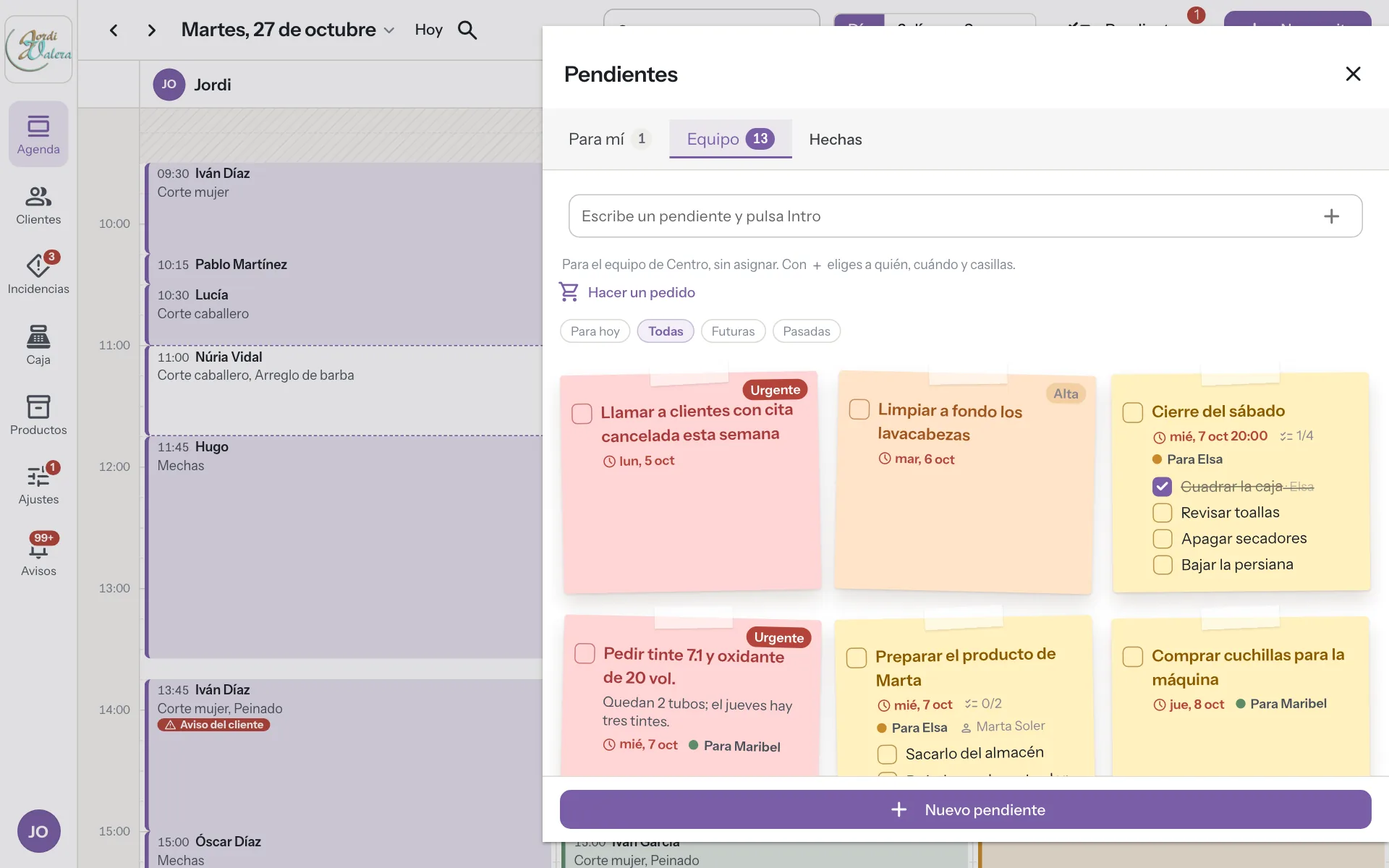
Jot down what must not be forgotten between clients, like a reminder just for you or a task for the team, assigned to someone or for whoever can do it. With a due date, priority and checkboxes, inside the diary.
Try it free for 14 daysSee prices
No card · No commitment
Welcome offer: 9,95 € a month for your first 2 months if you subscribe during the trial. Until November 15.
How it works
-
Jot it down in a second
Type it and press Enter. Private for you or for the location's team.
-
Assign it
To anyone at the location, to yourself or to nobody. With nobody assigned, whoever can does it.
-
A reminder on the due day
In the bell, to the assignee or the team. With a time, 30 minutes before.
A real case
The product that always ran out
It's Thursday and Maribel has two units left of a product she uses every day. Before, someone would say it out loud and it got forgotten. Now Jordi jots it down in To-dos, assigns it to Maribel for Friday and marks it urgent. On Friday morning Maribel gets the reminder, places the order and ticks it off. Jordi is told it's done.
Nothing gets lost in a corridor chat.
Sticky notes and group chats versus To-dos
-
A quick job between customers
Without DameHoraA sticky note on the screen that ends up on the floor.
With DameHoraYou note it in a second and it stays on the location's list.
-
Asking someone to do something
Without DameHoraYou mention it in passing and do not know whether they heard.
With DameHoraYou assign it with a date and they get the alert on the day it is due.
-
The opening checklist
Without DameHoraEveryone opens up their own way and something always gets forgotten.
With DameHoraA list with tick boxes, and the last box marks the task as done.
-
Something for a particular customer
Without DameHoraA loose note nobody links to their appointment.
With DameHoraThe task is linked to their appointment and record, and shows when you open them.
-
Knowing what is left
Without DameHoraYou ask in the group chat and nobody answers.
With DameHoraThe diary shows how many to-dos each person has, in red the overdue ones.
What you gain
Private or for the team
Nobody else sees your reminders, not even the owner.
Checklists
For opening, closing or an order. Tick each box and the last one completes the task.
Linked to the appointment or the client
“Get Marta's product ready” shows in her appointment and on her client card.
At a glance in the diary
How many each professional has and how many are for today, in red when overdue.
For your sector
- Software for hair salons
- Software for barbershops
- Software for nail salons
- Software for beauty salons
- Software for hair removal centres
- Software for brow and lash studios
- Software for make-up studios
- Software for micropigmentation centres
- Software for dog grooming salons
- Software for massage centres
- Software for tattoo studios
- Software for piercing studios
- Software for photography studios
- Software for tailors
- Software for bridal shops
- Software for image consultancies
- Software for accountancy firms
- Software for law firms
- Software for phone repair shops
Frequently asked questions
Who sees my to-dos?
Private ones, only you. Team ones, whoever works at that location.
Can an employee assign tasks?
Yes. Anyone on the team can assign a task to someone else at the location, the owner included.
Does it remind you when a task is due?
Yes, in the app's bell, 30 minutes before if it has a time or at 9:00 that day.
Does it cost extra?
No. To-dos are included in the fee.
Does it work for supplier orders?
Yes. Each supplier has its order days and the person who orders. On that day they get a reminder to place it, and when the order arrives the stock goes up by itself.
More features
The app you use now costs you too much. And you know it, and so do we!
At 9,95 € a month, with 3 professionals included and better features, you can save a lot of money, don't you think?